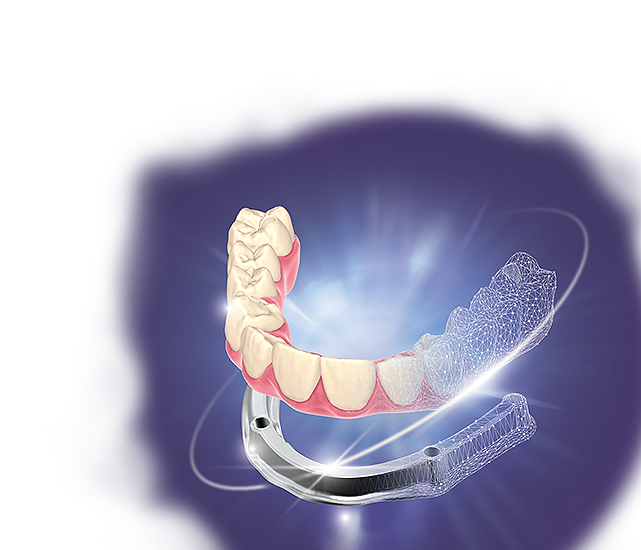
exocad has released PartialCAD 3.3 Chemnitz with a highly automated “split denture” workflow for implant-supported full-arch restorations.
The software lets a technician design an implant-based suprastructure in DentalCAD and generate a matching underlying bar in PartialCAD. The two components can then be adjusted and manufactured separately.
That separation is clinically and commercially interesting. A bar can provide the rigid implant-supported foundation while the overlying prosthetic component carries the teeth and gingival form. If the upper component is damaged, worn or needs substantial esthetic modification, a modular design may offer a different repair or replacement strategy from a monolithic restoration.
exocad’s central promise, however, is productivity. The company presents the new workflow as a faster and less complicated alternative to moving between disconnected design tools or building the bar manually.
The relevant question for laboratories is not simply whether PartialCAD can produce a design quickly. It is whether automation makes the complete workflow more predictable without concealing the tolerances, interfaces and verification steps that determine passive fit.
What the new workflow does
The split-denture feature connects three parts of the exocad environment:
- the implant-based suprastructure is designed in DentalCAD;
- the case is transferred into PartialCAD;
- the software generates a corresponding bar beneath the prosthesis.
The technician can accept the guided result or make manual adjustments.
exocad positions this route for PartialCAD users and technicians who do not have extensive experience with its Bar Module. The target is a laboratory that wants standardized designs and higher throughput rather than a completely bespoke bar created interactively for every case.
According to exocad’s own comparison, the automated PartialCAD approach can take less than four minutes for the design stage, compared with less than eight minutes for an interactive DentalCAD bar design.
Those figures should be understood as manufacturer workflow estimates, not independent productivity data. They do not include:
- reviewing the prescription and source records;
- correcting or reacquiring scan data;
- confirming implant positions and prosthetic space;
- selecting materials and production parameters;
- CAM preparation and manufacturing;
- finishing and assembly;
- testing the bar and suprastructure on a model or clinically;
- redesigning or remanufacturing a component that does not fit.
Saving four minutes in CAD can matter at scale. It cannot compensate for an inaccurate starting data set or an uncontrolled manufacturing process.
The most useful improvements may be the least dramatic
The split workflow is the headline feature, but PartialCAD 3.3 includes several tools that may have equal practical value.
Flatter bar-top control
Users can configure a level upper bar surface. Curve points control the outline and elevation of that plane.
A predictable interface between the bar and the overlying prosthesis can simplify design and assembly. Yet “flat” in the virtual model does not establish the manufactured accuracy of either component. The complete interface still depends on milling or printing tolerances, material behaviour, finishing and the method used to bond or retain the parts.
Enhanced retention-post tools
The software can subtract material from multiple components and add retention posts in a coordinated operation. This may reduce repetitive edits when developing the mechanical connection between the bar and the suprastructure.
The design still needs a material-specific engineering review. Post diameter, height, spacing, path of insertion, cement space and surrounding thickness can affect both assembly and fracture behaviour.
Minimum-thickness visualization
PartialCAD can identify thin regions in the gingival design and automatically add material according to a minimum-thickness setting.
This is a useful guardrail, especially in an automated workflow. It is not a universal strength calculation. The appropriate minimum depends on the restorative material, production method, connector geometry, span, loading and the manufacturer’s validated instructions.
Reusable preferences
Laboratories can save split-denture settings and reuse them across cases. This could improve consistency between technicians and reduce repeated setup.
Reusable presets also create a governance question: who approves them, for which materials and indications, and how are they reviewed when software, equipment or production parameters change?
Three modules are required
The workflow is not a stand-alone feature available with a basic DentalCAD installation.
exocad states that users need:
- PartialCAD;
- the Implant Module;
- the Bar Module.
PartialCAD 3.3 is available without an additional release fee to customers who already have a valid upgrade contract. Owners of a perpetual licence without an active upgrade contract must purchase an upgrade arrangement to access it. Flex subscription customers receive upgrades through their subscription.
exocad sells through resellers rather than publishing one universal direct price. A meaningful cost comparison therefore needs a regional quotation covering all required modules, the licence model, support and any upgrade-contract implications.
For a laboratory that already owns the three modules, the decision is mainly about training, validation and deployment. For a laboratory missing one or more modules, “faster design” needs to be converted into an economic case:
- How many qualifying cases are produced each month?
- How much technician time is actually saved per completed case?
- Does the workflow reduce remakes or only CAD interaction time?
- Will standardized designs fit the laboratory’s clinical and esthetic positioning?
- What training, CAM changes or additional quality-control steps are required?
Automation does not validate passive fit
The term “precisely fitting” appears in exocad’s product description, but the public materials do not provide a peer-reviewed validation study of the new split-denture feature.
Digital fit is the product of an entire chain:
clinical records → data registration → implant-position capture → CAD → file transfer → CAM → finishing → assembly → clinical seating
A highly accurate CAD operation cannot correct an implant position that was captured inaccurately. It also cannot prevent a milling, printing, finishing or bonding error introduced after design.
An in-vitro study of complete-arch implant-supported frameworks found that error accumulated differently across digital and analogue-digital workflows. The expanded uncertainty of both workflows was approximately 150 µm and 0.8 degrees. CAD was the most accurate stage; the largest distortions arose during data acquisition in the complete-digital workflow and during CAM in the analogue-digital workflow.
The finding is directly relevant to PartialCAD’s proposition. Automating CAD may make the most precise stage faster, while the larger risks remain upstream and downstream.
A 2025 micro-CT study of full-arch titanium frameworks manufactured through a fully digital workflow also reported a substantial tendency toward misfit. Only two of the intraoral scans used for framework production fell within the study’s 150-µm acceptable deviation range. The authors called for further validation as scanning technology develops.
Neither study evaluated PartialCAD 3.3 or exocad’s split-denture workflow. They show why a CAD time claim cannot serve as evidence of clinical fit.
There is also evidence that digital removable workflows can work
The caution should not be read as an argument against digital production.
A 2025 crossover clinical study compared mandibular removable partial-denture frameworks made with fully digital and combined analogue-digital workflows. Both produced clinically acceptable frameworks, while the fully digital group showed better accuracy in several measured areas.
That study used different software, a different prosthesis type and selective laser melting. It cannot validate an implant-supported PartialCAD split design. It does support the broader point that a controlled digital workflow can produce clinically useful removable frameworks.
The distinction is essential:
- digital workflows can be accurate;
- automated design can improve consistency;
- neither statement proves that a particular feature, preset or production chain is accurate for every full-arch case.
What laboratories should validate before routine use
A sensible introduction would begin with a limited, documented pilot rather than immediate use across every qualifying case.
1. Define the indication
Specify which implant configurations, restorative materials, manufacturing methods and prosthetic designs are included. Do not treat “All-on-X” as one homogeneous indication.
2. Lock the starting records
Record how implant positions are captured and verified. If the laboratory accepts intraoral scans, define when photogrammetry, verification jigs, models or conventional impressions are required.
3. Compare automated and established designs
For a sample of cases, create the new automated design and the laboratory’s current reference design. Compare:
- bar geometry and thickness;
- cantilever and connector dimensions;
- prosthetic space;
- screw-channel relationships;
- retention features;
- cleanability and access;
- CAM feasibility;
- technician intervention time.
4. Measure manufactured interfaces
Do not stop at an attractive on-screen section view. Evaluate the produced bar, the suprastructure and their interface using the laboratory’s documented acceptance method.
5. Track total—not only CAD—time
Include data preparation, design corrections, CAM preparation, manufacturing, finishing, assembly, inspection and remakes. The new workflow is economically useful only if it lowers total labour or failure cost.
6. Audit consistency by operator
Automation should reduce unwanted variation between technicians. If results still differ substantially, the laboratory needs to identify which manual decisions, presets or upstream records are responsible.
A productivity tool with a validation obligation
PartialCAD 3.3 Chemnitz addresses a real laboratory problem.
Designing a modular full-arch restoration across separate tools can be slow and difficult to standardize. A guided workflow that derives the supporting bar from the approved suprastructure could reduce repetitive CAD work, broaden access to bar design and make production rules easier to reproduce.
The commercial caveat is that three exocad modules are required. The technical caveat is more important: a fast virtual split does not guarantee a passive clinical fit.
For laboratories already working inside exocad, the release deserves a controlled evaluation. The most useful question is not whether the demonstration bar appears in under four minutes. It is whether the complete, manufactured restoration meets the laboratory’s fit criteria more consistently and with less total intervention than the established workflow.
If the answer is yes, PartialCAD 3.3 could turn a specialist design task into a repeatable production process.
If the answer is measured only with a stopwatch, the laboratory has validated speed—not dentistry.
At a glance
| Item | Published information |
|---|---|
| Release | PartialCAD 3.3 Chemnitz |
| Announced | February 26, 2026 |
| Main feature | Guided split-denture workflow for an implant-supported suprastructure and underlying bar |
| Required software | PartialCAD, Implant Module and Bar Module |
| Manufacturer design-time claim | Under 4 minutes for the automated PartialCAD route |
| Manual adjustment | Supported |
| Additional tools | Flat bar-top control, enhanced retention posts, thin-area visualization and reusable presets |
| Upgrade access | Included for users with a valid upgrade contract; other perpetual-license users must upgrade |
| Independent validation of this feature identified | None as of July 23, 2026 |
Sources
- exocad, “exocad’s new PartialCAD 3.3 Chemnitz introduces a split denture workflow.” February 26, 2026. Accessed July 23, 2026.
- exocad, “PartialCAD 3.3 Chemnitz.” Accessed July 23, 2026.
- exocad, “PartialCAD 3.3 Chemnitz at a glance.” February 2026. Accessed July 23, 2026.
- Pan Y, Tsoi JKH, Lam WYH, Zhao K, Pow EHN. “The cumulative effect of error in the digital workflow for complete-arch implant-supported frameworks: An in vitro study.” Clinical Oral Implants Research. 2022;33(9):886–899.
- “Evaluation of the accuracy of digital workflow for implant-supported full-arch fixed dental prostheses using a novel micro-CT measurement technique.” Journal of Prosthodontics. 2025.
- “Accuracy assessment of removable partial denture frameworks fabricated by selective laser melting using two different workflows: A cross-over clinical study.” 2025.
Image credit
exocad, official PartialCAD 3.3 Chemnitz product image. Editorial use remains subject to exocad’s media terms.
Editorial disclosure
This article analyzes manufacturer documentation and peer-reviewed research. It was independently written, was not sponsored and contains no affiliate links. Digital Dentistry Daily had not independently tested PartialCAD 3.3 Chemnitz at the time of writing. Product names and trademarks belong to their respective owners.
About the author