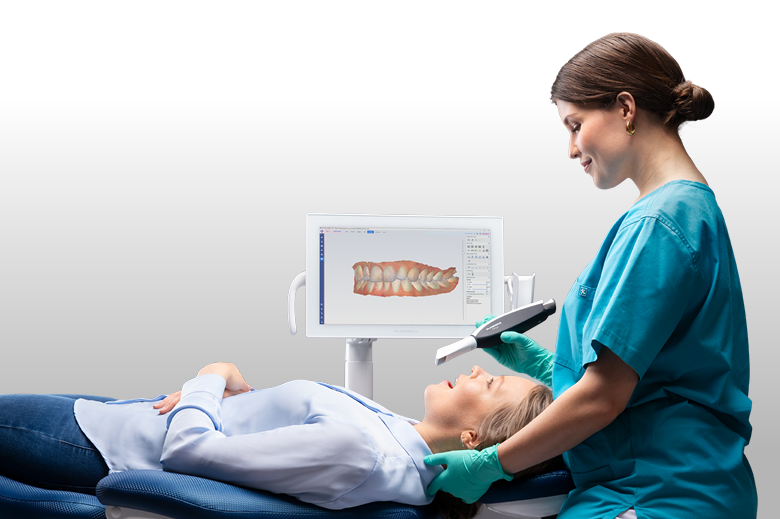
Standfirst: Planmeca’s new intraoral scanner can operate wirelessly or through a cable, move between treatment rooms and export STL and PLY files. Those features are useful—but buyers should look closely at the workstation requirements, software architecture and evidence behind the accuracy claims.
Planmeca has made its Onyx intraoral scanner available for orders, more than a year after first presenting the system at IDS 2025.
The launch enters a scanner market that is no longer defined only by whether a device can produce an acceptable digital impression. Most established systems can handle routine restorative scanning. The harder questions now concern how easily a scanner moves between rooms, what computer it requires, how its software is licensed, which files can leave the ecosystem and how reliably it supports more demanding indications.
Onyx addresses several of those questions in an interesting way. It is not simply wireless, and it is not simply corded. The same handpiece supports both modes. Planmeca is positioning that choice as an operational advantage: wireless for mobility and ergonomics, cable operation for long cases or clinics that do not want battery availability to determine when a scan can begin.
That flexibility is meaningful. It does not, by itself, establish that Onyx is more accurate, faster or more economical than competing scanners.
What Planmeca has launched
According to the company’s June 22 announcement, Onyx is now available for orders, subject to regional availability.
The scanner uses projected-pattern triangulation and an actively heated scanning tip. Red, green and blue LEDs provide the light source. Scanning takes place inside Planmeca Romexis, version 6.5.2 or newer.
Planmeca’s published technical specifications list the following:
| Specification | Published detail |
|---|---|
| Operating modes | Wireless and wired |
| Scanner weight | 286 g with tip and battery; 333 g with tip and cable |
| Battery provision | Three batteries and charger included |
| Claimed battery performance | Up to 45 minutes of scanning and eight hours of standby per battery |
| Connectivity | LAN plus Wi-Fi 5, 6 and 6E |
| Export formats | STL and PLY |
| Tips | Autoclavable Standard and SlimLine sizes |
| Scanning software | Planmeca Romexis 6.5.2 or newer |
| Supported records | Single tooth, full arch, scan bodies, bites, models, impressions and 2D snapshots |
The battery figure should be interpreted carefully. Three 45-minute batteries suggest substantial capacity across a working day if charging and rotation are managed well. It does not mean a clinic is guaranteed 135 minutes of uninterrupted real-world scanning. Battery age, wireless conditions, standby behaviour, charging time and the way the scanner is shared will matter.
The cable option reduces that uncertainty. It also increases the listed handpiece assembly weight by 47 g and reintroduces a physical connection to the workstation.
Wireless is useful; flexible deployment may be more important
The more consequential feature may be the way Onyx is deployed across a clinic.
Planmeca describes a configuration in which the scanner connects to one master computer while the scanning process can be mirrored on Romexis workstations elsewhere on the clinic network. The handpiece can also be connected to a Planmeca Imprex mobile station or attached to a compatible Planmeca dental unit.
For a multi-room practice, this could allow one scanner to serve several operatories without moving a dedicated cart every time. That matters because scanner utilisation—not raw scanning speed—is often the variable that determines whether an investment is productive.
The practical test will be how quickly staff can move the scanner, select the correct patient, establish a connection and begin scanning in another room. Network stability and IT configuration will be part of the clinical experience.
This is also different from a fully browser-based or cloud-native model. Onyx remains centred on a designated Windows master computer and the local Romexis environment. Practices comparing platforms should not treat every claim of “mobility” as the same architecture.
AutoMerge challenges the traditional scanning sequence
Planmeca says its AutoMerge software lets users capture an arch in any order and in multiple segments, with the software combining the pieces into a complete model. If this works consistently, it could reduce the penalty for losing tracking and give clinicians more freedom around difficult anatomy.
This is a manufacturer claim, not yet an independently established clinical advantage.
Segment merging can be valuable, but every stitching or alignment step also creates a question: how reliably does the software identify the correct relationship between sections, particularly across repetitive geometry or a long edentulous span? The answer may differ between a single crown, a dentate full arch and a full-arch implant workflow.
As of July 23, 2026, Digital Dentistry Daily did not identify a peer-reviewed clinical comparison evaluating Onyx against current competing scanners. Until such evidence is available, claims about accuracy, scanning depth and automatic merging should be treated as product specifications requiring independent verification.
The computer requirement belongs in the purchase price
The scanner does not operate in isolation.
Planmeca recommends a Windows 11 Pro master computer with a 13th-generation Intel Core i7 or newer processor, 32 GB of RAM, a 512 GB SSD and an NVIDIA RTX A3000 or better graphics card. Those are workstation-class requirements, particularly on the graphics side.
Romexis 6.5.3 also introduced a CUDA-based scanning engine designed for newer NVIDIA hardware, according to the company’s software release information.
A practice should therefore request a complete installed price, not only the scanner price. The calculation should include:
- the master workstation;
- monitors or mobile stations;
- network upgrades where necessary;
- Romexis modules and licences;
- training;
- support and replacement arrangements;
- additional tips and batteries;
- integration with the practice-management system;
- any cloud-transfer or storage charges.
If an existing workstation meets the requirements, the infrastructure cost may be modest. If it does not, the computer could materially change the comparison with a scanner sold as a self-contained cart or a cloud-oriented system.
How open is the workflow?
Onyx exports STL and PLY files. Planmeca says those exports do not carry click fees.
That is a positive starting point for practices that want to work with independent laboratories. STL carries geometry but not colour. PLY can retain colour information, which may be useful for communication and certain downstream workflows. OBJ is not listed as a native Onyx output in the published specifications.
File export is only one part of openness. Buyers should also ask:
- Can every scan be exported without an active premium module?
- Are raw and processed datasets both available?
- Can a case be transferred directly to any laboratory?
- Which metadata are preserved during export?
- Can exported scans be reused in third-party planning software?
- What happens to access if a Romexis licence or service agreement ends?
- Are there charges for cloud transfer even when local export is free?
A scanner can support open file formats while still delivering its best experience inside a tightly integrated ecosystem. That is not automatically a disadvantage. It should, however, be understood before purchase.
Who should consider it?
On paper, Onyx looks most relevant to existing Planmeca customers and clinics that value room-to-room mobility without giving up cable operation.
The case is strongest where a practice already uses Romexis for imaging, planning or chairside manufacturing. In that setting, scan data can move directly into a familiar patient record and connect with Planmeca’s design, milling and printing tools.
For a clinic outside the Planmeca ecosystem, the decision is less obvious. STL and PLY export may provide sufficient interoperability, but the required master workstation and Romexis-centred workflow add infrastructure that should be compared with alternative systems.
The lack of published pricing also prevents a meaningful value judgement. Availability, software bundles and support terms may vary between regions.
Questions to ask before ordering
- What is the complete installed price, including the recommended workstation?
- Which Romexis licences are included, and which require recurring payments?
- What are the battery charging time, replacement cost and expected service life?
- Can the scanner change rooms without restarting or reselecting the case?
- What happens if the local wireless network becomes unstable?
- Which indications have been independently validated?
- Are STL and PLY exports unrestricted and free for every case type?
- What is the replacement or loan-scanner policy?
- How many autoclave cycles are the tips validated for?
- Is local hands-on training included?
The bottom line
Planmeca Onyx introduces a sensible form of flexibility: use wireless operation when mobility matters and connect a cable when continuity matters more.
Its larger proposition is the combination of a mobile handpiece, local network deployment and the Romexis ecosystem. That could be efficient for the right clinic, especially one already invested in Planmeca infrastructure.
The remaining questions are familiar but important. Independent clinical evidence is still needed. Regional pricing is not public. The recommended computer is substantial. And the practical meaning of an “open” workflow depends on more than whether STL export appears on a specification sheet.
Onyx deserves a place on the shortlist. Whether it changes the buying equation will depend less on the novelty of switching between battery and cable than on the total cost and reliability of the workflow around it.
Sources
- Planmeca, “Planmeca’s new intraoral scanner now available,” June 22, 2026. Accessed July 23, 2026.
- Planmeca, “Planmeca Onyx technical specifications.” Accessed July 23, 2026.
- Planmeca, “Planmeca Onyx product information.” Accessed July 23, 2026.
- Planmeca, “Romexis 7 software release 6.5.3.” Accessed July 23, 2026.
Editorial disclosure
This article reports on a manufacturer announcement and published product specifications. It was independently written, was not sponsored, and contains no affiliate links. Digital Dentistry Daily had not independently tested Planmeca Onyx at the time of writing. Product names and trademarks belong to their respective owners.
Image credit
Planmeca Onyx in clinical use. Credit: Planmeca / Cision, official press image. Editorial use remains subject to the source’s press-material terms.
About the author